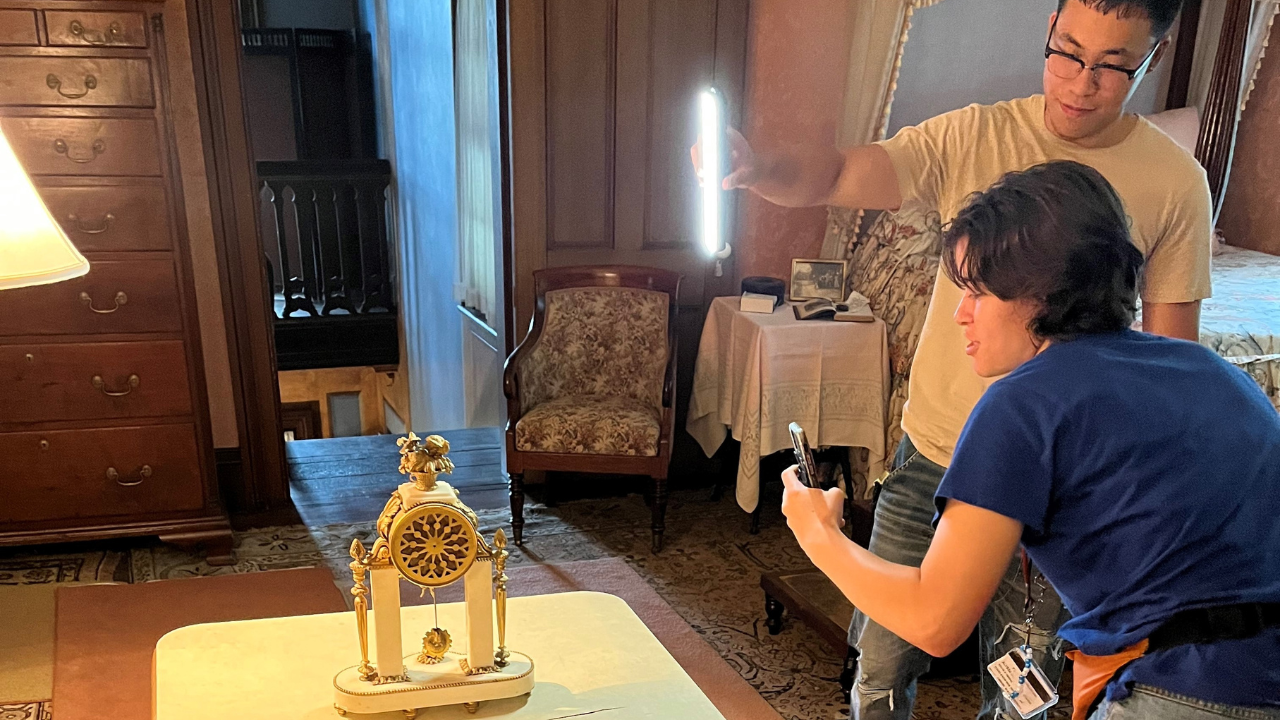
When I started in museums, it wasn’t my plan to work in museum education and customer care, but this field has ways of surprising you. As it turns out, the most fulfilling work I’ve ever gotten to do has come through a years-long project at Fosterfields Living Historical Farm, where I’m Lead Educator, working with local services and partners to give visitors better accessibility and a well-rounded museum experience.
This all began with the Sensory Tools for Interpreting Historic Sites grant, an initiative funded through the Institute of Museum and Library Services (IMLS) and led by the New York University (NYU) Ability Project and the Intrepid Museum in New York City. Through the initiative, these organizations paired eight historic sites from around the nation, including Fosterfields, with students from NYU and experts at the Intrepid to make their inaccessible spaces more sensory-friendly. Afterward, the Intrepid published an online toolkit with our findings that all museums can access.
I’ll be honest. When we got the grant, I didn’t know where to start. Most of the other historic sites opted to create mobile apps, but since Fosterfields is a government facility and we had just spent funds to create a new website, I decided not to pursue that path. After some thought, our collections team and I decided to create tactile objects for our historic house, The Willows, and the farm, including 3D-printed items, maps, and more. While this task seemed intimidating at first, we were able accomplish a great deal, and the project continues to inspire our team. Today, accessibility has become a core component of our programming, partnerships, and site design.
I wrote this article to help inspire others who feel stuck at any point along their accessibility journey, whether just starting out or somewhere along the way. I’ll share the details of the accessibility guides and tactile projects we’ve accomplished and give you some related tips to increase your site’s accessibility that are easy and no-cost. These projects can easily be plugged into your existing websites and advertised on your social media.
Sensory Guides
Sensory guides are documents that show the museum at a glance, mapping the areas around your site with symbols that indicate which might be loud, food-restrictive, touch-friendly, or etc. You can check out ours here.
Start Here:
- Think about the information you want to convey in your guide. We created symbols to show noise levels, hands-on activities, and accessible areas. Other information might include illumination or olfactory levels. We created most of our symbols using clip art on Canva.
- Using Canva, PowerPoint, or other software that can create a table, break down your site into different areas to create your sensory guide sheets.
- For example, we have five sheets for the farm, including the visitor center, barnyard, and more.
- These sheets then show the activities available in these areas.
- Next, walk around your museum during a busier day. Take note of what is happening in your activity areas. Is it noisy? Are people able to eat? Are visitors getting around comfortably?
- Once you have completed your walking tour, use the symbols on the sheet to indicate what you want visitors to know. Include photos so visitors can orient themselves to your site.
- After you create the guide, make the document available in PDF, as many visitors might not have access to Microsoft Office on their personal devices.
Social Narratives
A social narrative is a visual guide that outlines step-by-step what visitors experience when visiting your museum, so they know what to expect. This can be displayed as a PowerPoint PDF on your website. Here is ours.
Start Here:
- The number of slides used depends on your site’s specifics. Our social narrative is broken down into three sections: What to Expect for Your Visit, What to Expect Upon Arrival, and What to Expect on the Farm.
- Make the slides accessible for people who are blind or low-vision by using white backgrounds with black sans serif type and images. Embed alternative text with written descriptions in the images.
- Social narratives are best written from the point of view of a younger visitor, which allows for better universal understanding. Your text could look like this: “When we arrive at the farm, we will walk a few steps to the entrance, which is flat and paved.”
- A good place to start is to explain what visitors should know before their visit.
- What will the museum teach them?
- Are there rules to follow?
- Are food and drinks available?
- You can also include what to expect upon arrival.
- What is the parking like?
- Where do you pay admission?
- Last, what will they experience once they have paid the admission fee?
- Will there be large groups of people?
- What types of exhibits and areas of interest will they see?
- What are the walking areas like?
Site Accessibility Information
A site accessibility sheet covers the different areas of your museum and thoroughly describes the what and where of accessibility.
Start here:
- Write this document in Microsoft Word or a similar platform. Then convert it into a PDF and add it to your website.
- Describe in detail what guests might encounter in terms of accessibility as they walk through your site. The goal is to describe the experience as if the document does not include any images.
- Ideally, these descriptions will point out Americans with Disabilities Act (ADA)-accessible areas as well as inaccessible situations.
- Here is an example: “The 1915 farmhouse is ADA accessible with a ramp next to the main entrance and five stairs to the front door. The farmhouse bathrooms, located at basement level with an exterior door, are also ADA accessible.”
- What else to include:
- Parking areas with the number of accessible spots.
- Entrances to buildings: Are there automatic doors? Are there steps or is there an elevator?
- Once in the museum, what will they encounter physically at different exhibits and interactives?
Physical Sensory Objects
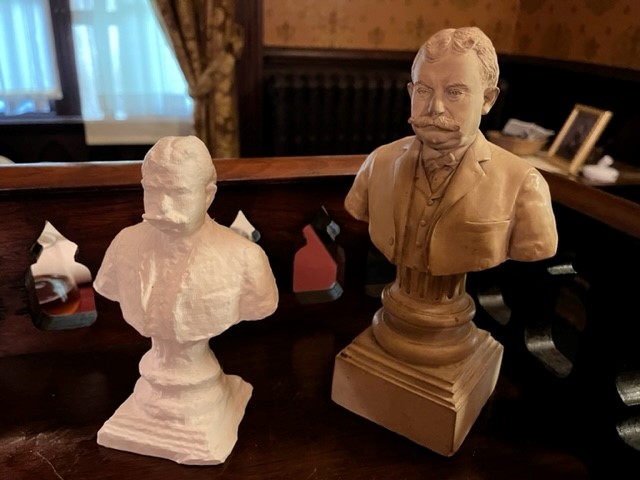
Before creating anything meant for a specific group, it is important to get feedback about what you are planning. For 3D objects, I reached out to the Seeing Eye and Vision Loss Alliance of New Jersey. We hosted their groups to get their insight on project ideas.
3D-printed objects offer visitors the chance to interact with objects that they normally cannot touch. It can be expensive to create these using a 3D printer, but there are easier ways to obtain them.
Start Here:
- Establish which objects will be 3D-printed. Ask staff or focus groups what they would like to handle from the collection that is off limits.
- I did this process with homeschool students. Based on their responses, we printed some cool, obscure objects.
- Learning CAD software or purchasing a 3D printer can be out of scope for many museums. An efficient use of time is to look for interns at local universities. Many colleges with art/design programs have 3D printing labs with students looking to create a project or gain experience developing their skills.
If you can’t offer interns a stipend, then recommendation letters, accreditation, or an opportunity to present their work can be a good compromise. An event showcasing their work can also provide students with chances to network.- I have worked with three sets of students, and each group learned how to produce accurate 3D prints and engage with a community partner.
- Some high schools also have 3D printing classes. Reach out to a local school to create a partnership.
- Another resource is local libraries. Those that have 3D printers may offer classes on how to create small-scale objects or allow library card holders to use their labs.
- After you have created your partnerships and established a project due date to receive your prints, reserve time for your interns to visit the site and look at the objects you want to replicate.
- The interns will need to have access to collections areas to scan the objects. Notify collections staff for object-handling purposes.
- Prints should use high-contrast color schemes, such as yellow and black or white and black.
- Once the scans are created, the interns will create the prints. Stay in contact and offer guidance about the project.
Tactile Site Maps
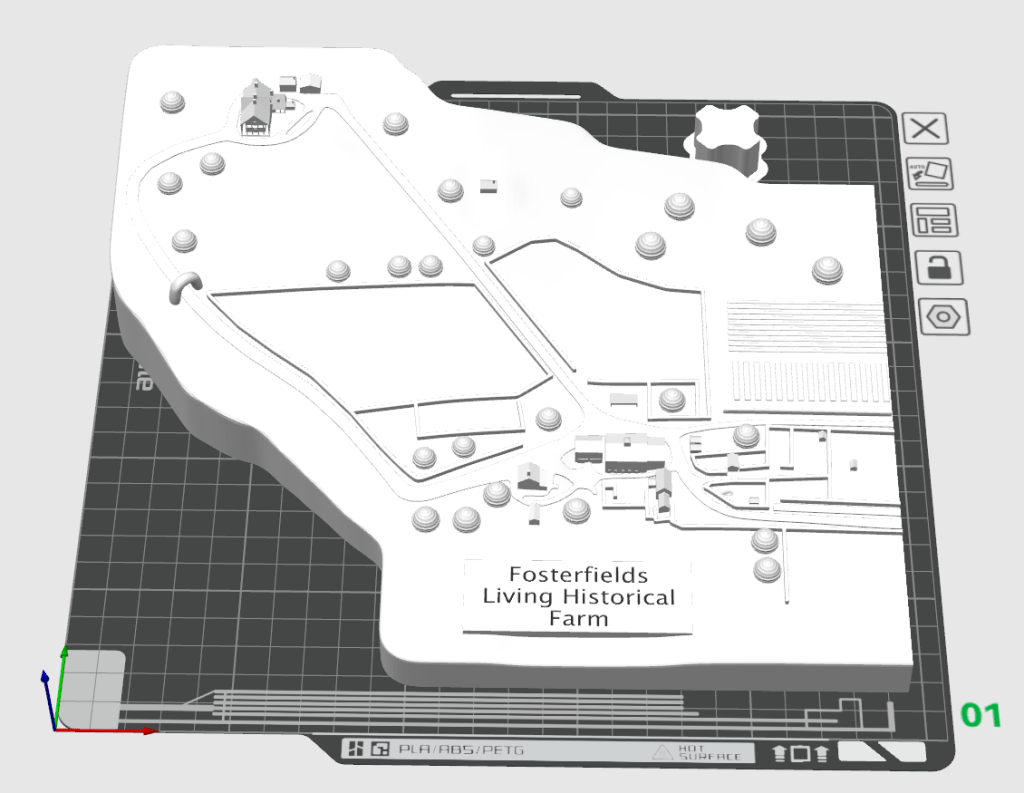
3D maps allow visitors with low vision or tactile needs to feel the layout of a site before they physically go into the space.
Start Here:
- Following steps 1–2 of the 3D printing guide, you can also have interns create tactile maps.
- Have interns walk the site with staff and discuss what should be in the tactile map. Things to be included:
- Stairs, ramps, elevation changes, buildings, and exhibits.
- Paths, trees, fences, or other physical barriers.
- The map needs to be in high-contrast colors. A white map with a black path is a good combination.
- Once the interns understand your design concept, they can continue to work independently.
Upcoming Events
-
Planning and Budgeting for Fundraising Success – OMA Webinar
Event Date:Presented by: Ohio Museums Association -
AASLH History Hour: Civic Practice
Event Date:Presented by: American Association for State and Local History (AASLH) -
What It’s Like to Participate in Museums Advocacy Day
Event Date:Presented by: American Alliance of Museums -
From Idea to Acceptance: How to Submit a Winning Annual Meeting Session Proposal
Event Date:Presented by: American Alliance of Museums